Showing posts with label array. Show all posts

Monday, January 21, 2019

Modify an Array Stored in an Object

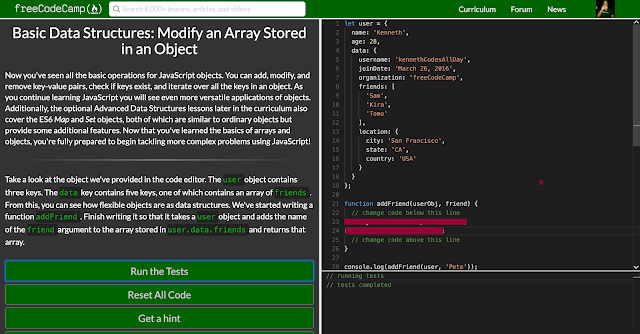
Basic Data Structures: Modify an Array Stored in an Object
Now you've seen all the basic operations for JavaScript objects. You can add, modify, and remove key-value pairs, check if keys exist, and iterate over all the keys in an object. As you continue learning JavaScript you will see even more versatile applications of objects. Additionally, the optional Advanced Data Structures lessons later in the curriculum also cover the ES6 Map and Set objects, both of which are similar to ordinary objects but provide some additional features. Now that you've learned the basics of arrays and objects, you're fully prepared to begin tackling more complex problems using JavaScript!


Take a look at the object we've provided in the code editor. The user object contains three keys. The data key contains five keys, one of which contains an array of friends. From this, you can see how flexible objects are as data structures. We've started writing a function addFriend. Finish writing it so that it takes a user object and adds the name of the friend argument to the array stored in user.data.friends and returns that array.
Saturday, January 5, 2019

Basic Data Structures: Iterate Through All an Array's Items Using For Loops

Basic Data Structures: Iterate Through All an Array's Items Using For Loops
Sometimes when working with arrays, it is very handy to be able to iterate through each item to find one or more elements that we might need, or to manipulate an array based on which data items meet a certain set of criteria. JavaScript offers several built in methods that each iterate over arrays in slightly different ways to achieve different results (such as every(), forEach(), map(), etc.), however the technique which is most flexible and offers us the greatest amount of control is a simple for loop.

Consider the following:

function greaterThanTen(arr) {
  let newArr = [];
  for (let i = 0; i < arr.length; i++) {
    if (arr[i] > 10) {
      newArr.push(arr[i]);
    }
  }
  return newArr;
}

greaterThanTen([2, 12, 8, 14, 80, 0, 1]);
// returns [12, 14, 80]
Using a for loop, this function iterates through and accesses each element of the array, and subjects it to a simple test that we have created. In this way, we have easily and programmatically determined which data items are greater than 10, and returned a new array containing those items.


We have defined a function, filteredArray, which takes arr, a nested array, and elem as arguments, and returns a new array. elem represents an element that may or may not be present on one or more of the arrays nested within arr. Modify the function, using a for loop, to return a filtered version of the passed array such that any array nested within arr containing elem has been removed.

Sunday, December 23, 2018

Remove Items Using splice()

Ok, so we've learned how to remove elements from the beginning and end of arrays using shift() and pop(), but what if we want to remove an element from somewhere in the middle? Or remove more than one element at once? Well, that's where splice() comes in. splice() allows us to do just that: remove any number of consecutive elements from anywhere in an array.

splice() can take up to 3 parameters, but for now, we'll focus on just the first 2. The first two parameters of splice() are integers which represent indexes, or positions, of the array that splice() is being called upon. And remember, arrays are zero-indexed, so to indicate the first element of an array, we would use 0. splice()'s first parameter represents the index on the array from which to begin removing elements, while the second parameter indicates the number of elements to delete. For example:

let array = ['today', 'was', 'not', 'so', 'great'];

array.splice(2, 2);
// remove 2 elements beginning with the 3rd element
// array now equals ['today', 'was', 'great']
splice() not only modifies the array it's being called on, but it also returns a new array containing the value of the removed elements:

let array = ['I', 'am', 'feeling', 'really', 'happy'];

let newArray = array.splice(3, 2);
// newArray equals ['really', 'happy']

We've defined a function, sumOfTen, which takes an array as an argument and returns the sum of that array's elements. Modify the function, using splice(), so that it returns a value of 10.

Monday, December 17, 2018

Basic Data Structures: Access an Array's Contents Using Bracket Notation

Basic Data Structures: Access an Array's Contents Using Bracket Notation
The fundamental feature of any data structure is, of course, the ability to not only store data, but to be able to retrieve that data on command. So, now that we've learned how to create an array, let's begin to think about how we can access that array's information.

When we define a simple array as seen below, there are 3 items in it:

let ourArray = ["a", "b", "c"];
In an array, each array item has an index. This index doubles as the position of that item in the array, and how you reference it. However, it is important to note, that JavaScript arrays are zero-indexed, meaning that the first element of an array is actually at the zeroth position, not the first.

In order to retrieve an element from an array we can enclose an index in brackets and append it to the end of an array, or more commonly, to a variable which references an array object. This is known as bracket notation.

For example, if we want to retrieve the "a" from ourArray and assign it to a variable, we can do so with the following code:

let ourVariable = ourArray[0];
// ourVariable equals "a"
In addition to accessing the value associated with an index, you can also set an index to a value using the same notation:

ourArray[1] = "not b anymore";
// ourArray now equals ["a", "not b anymore", "c"];
Using bracket notation, we have now reset the item at index 1 from "b", to "not b anymore".


In order to complete this challenge, set the 2nd position (index 1) of myArray to anything you want, besides "b".

Sunday, July 15, 2018

Basic JavaScript: Stand in Line

In Computer Science a queue is an abstract Data Structure where items are kept in order. New items can be added at the back of the queueand old items are taken off from the front of the queue.
Write a function nextInLinewhich takes an array (arr) and a number (item) as arguments.
Add the number to the end of the array, then remove the first element of the array.
The nextInLinefunction should then return the element that was removed.

Monday, August 7, 2017

Falsy Bouncer


  • Remove all falsy values from an array.


  • Falsy values in JavaScript are false, null, 0, "", undefined, and NaN.


  • Remember to use Read-Search-Ask if you get stuck. Write your own code.


Here are some helpful links:

Boolean Objects
Array.prototype.filter()